The platform
One system, from the shipping dewar to the classes you keep.
What follows is laid out in the order a grid actually moves — not by feature category. Read it straight through and you have the whole session. That continuity is the product; everything else is a consequence of it.
Live microscope and camera functions depend on the instrument bridge and hardware validated for your deployment; processing and facility workflows can be adopted independently.
Before the column
The grid has a history before it has an atlas.
A sample is frozen, boxed, shipped, logged, and booked onto an instrument long before anyone presses acquire. Most acquisition software meets the grid only after all of that has happened — and treats the preceding weeks as something to be re-typed.
Sample logistics
- Shipments in and out, with arrival and condition records
- Dewars → pucks → grid boxes → vial boxes → vials → grids
- Samples and aliquots, linked to the grids made from them
- Chain-of-custody events for every physical handoff
People and access
- Projects, teams, people, and external customers
- Instrument bookings with conflict-aware slot suggestions
- Facilities and instrument registry across sites
- Ownership and permissions that follow the project, not the folder
On the column
A collection plan you can read before you run it.
Targeting is treated as a compiler, not a wizard. You declare what you want collected; the system derives a versioned plan, expands it into exact microscope actions, and commits it as a durable queue. Every step of that translation stays inspectable.
Setup and calibration
- Presets and preset alignment for atlas, grid, hole, focus and data states
- Matrix calibration, pixel size, beam shift, movement and stage limits
- Dose, apertures, detector references, grid types, storage targets
- A software preflight that shows what is loaded and current for operator review
Targeting
- Autoloader and cassette selection
- Atlas montage with coverage preview and tile-level progress
- Square detection, ranking, filtering, and stratified sampling
- Hole finding with selectable algorithms and live detection tuning
- Image-shift cluster preview validated against your maximum shift
- Exposure, focus and drift template overlaid on a real hole image
Plan and queue
- Worklist → normalized worklist → plan → actions → queue revision → run events
- Template and target data snapshotted the moment a plan is committed
- Every action carries dependencies, preconditions and a readable reason
- A pre-queue gate for tool permissions, shift limits, and time/image/stage budgets
- Advanced operators can inspect and edit the queue without the wizard
- Route preview and status map, tied back to atlas coordinates
While the session runs
Quality that is allowed to change what happens next.
Drift rate, focus success, astigmatism, coma, CTF fit confidence, ice thickness — these are measurable while there is still time to act. Here they are signals the run responds to, not a report you read the next morning.
Live tuning
- Autofocus by beam tilt and by stage
- Automated stigmation and coma correction
- Drift stabilization with measured rate and wait policy
- Node, microscope and camera state exposed as an explicit control plane
Live quality
- FFT and CTF fit as the movies arrive
- Motion and drift trajectories per exposure
- Ice thickness and contamination flags per hole
- Continue, recheck, skip, pause or abort on bad statistics
- Retries, skips and exceptions recorded as run events, never as edits to intent
After the frames land
Processing that still knows where the data came from.
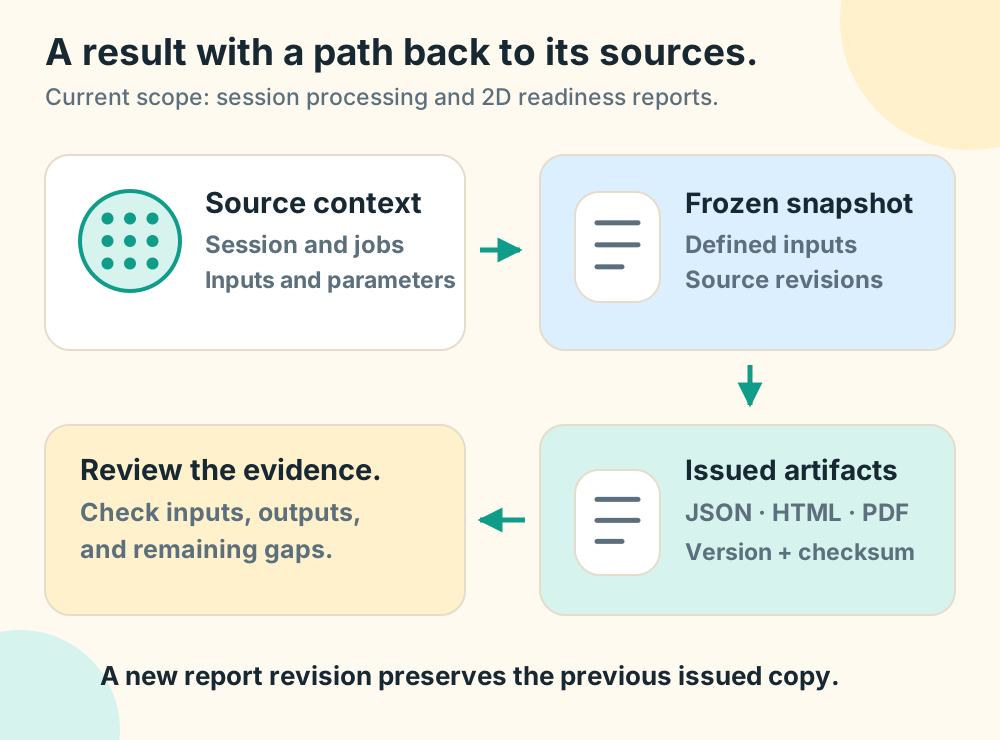
Motion correction, CTF estimation, picking and classification run at session scale — and every result stays attached to the exposure, hole, square, atlas and grid it originated from. The session context is never flattened into filenames.
Processing
- Motion correction, CTF estimation, FFT, stack building
- Template-based and model-based particle picking
- 2D classification and class selection
- Submit against one image or an entire session
- Live progress streaming, with every result persisted
Looking at results
- Result-specific views — Thon-ring sketches, drift traces, particle overlays
- Hierarchy browser in column, gallery, table and list modes
- Image viewer with metadata strip and overlay layers
- Analysis workspaces, saved selections and labels
- Jobs, runs, artifacts and pipeline health in one place
Across the facility
The unit of work is a facility, not a workstation.
Once sessions, instruments, nodes and people share one model, the questions a facility manager actually has become answerable — without exporting anything.
Analytics
- Throughput over time, by instrument and by project
- CTF and defocus distributions across sessions
- Ice quality as a grid heatmap
- GPU utilization and microscope KPI tables
- Recent jobs, FSC overlays, and per-instrument comparison
Operations
- Node discovery and fleet health across machines
- System activity log and in-app messaging
- Security, members, and team administration
- Runs entirely on your own hardware — laptop, cluster, or cloud
Making it yours
Your method, as a first-class step.
The reason a platform outlives its authors is that reviewed methods can be added without exposing or changing the platform core. A typed extension contract defines inputs, outputs, resources, and result presentation.
Plugins
- Reviewed extension contract → consistent forms and results
- Consistent submission and result experience for every method
- A plugin catalogue your facility controls
Workflows
- Visual editor for source, compute, decision and transform steps
- Sources: watched directories, URLs, EMPIAR accessions, S3, GCS, Azure, event streams, REST
- Validation before a workflow is allowed to run
- Workflows and presets stored as versioned, reviewable objects
- A built-in assistant for navigating what ran and why
Why it holds together
Six chapters, one data model.
Nothing above is a separate module talking to another separate module over a shared drive. A grid, a session, a target, a job and a result are the same objects in all six sections — which is why a result can point back at the hole it came from, and why a hole can tell you why it was chosen.
- Spans
- Dewar to 2D classes
- Runs on
- Laptop, cluster, or cloud
- Extends with
- Reviewed typed contracts
- Deployment
- Private and controlled
Get started
See the whole chain on real data.
Open the bundled demo session and follow one grid through every chapter above, or install locally in five steps.